

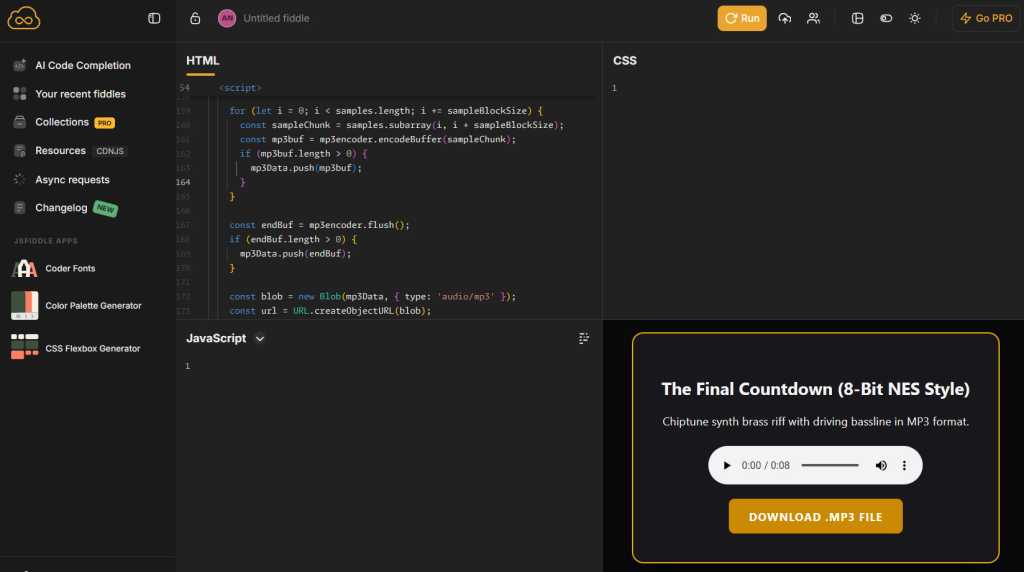
Tap or click the “HTML” field, then paste the code from the clipboard (press and hold any open space on Android and select “Paste” from the menu that appears). Click or tap the Run button and ta-da: you’ll see a player for listening to your own Gemini-generated audio and a button to download it.
JR Raphael Foundry
If you like what you hear, click the button to download the file, then go to the Sound section in your Android system’s settings to save it and make it available to use as any type of alert or ringtone. The exact steps to do this will vary from one type of Android device to another, but on a Pixel or another phone that supports Google’s core Android interface, you’ll tap Ringtone or Notification, then tap My Sounds and tap the plus icon to import your own file from your phone’s local storage.
On a Samsung device, you’ll start the same way, but look for the plus icon in the Ringtone section of Settings, then tap the Folders tab to find locally downloaded files. Samsung doesn’t let you easily add custom notification sounds, which is annoying, so you’ll need to open the Google Files app, find the file you downloaded in your Downloads folder, then tap the three-dot icon next to it to copy it to a folder called Notifications. Once the file is in this folder, it should appear as a notification noise option in Samsung Android settings.